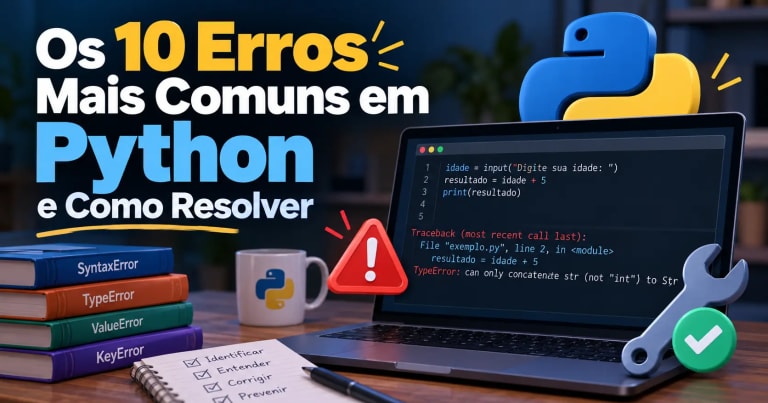
If you are learning Python, you have probably encountered a frustrating situation: you ran your code, expected to see the result, and instead got an error message filled with English words, unfamiliar names, and line numbers.
At first, this can seem complicated. You look at the message, try to understand what happened, and sometimes end up changing several parts of your code without knowing exactly where the problem is.
This difficulty is common among beginners. Learning to program does not just mean writing commands correctly; it also means developing the ability to identify problems, interpret messages, and find solutions.
In this guide, you will learn how to fix errors in Python, explore ten common errors, and understand what to do when they occur. For each situation, we will look at an incorrect example, the expected error message, the cause of the problem, and a corrected version of the code.
We will also explore how to interpret a traceback and walk through an illustrative case study showing how to investigate an error step by step.
Why Do Errors Occur in Python?
A program consists of instructions that must follow certain rules. When one of these rules is violated or the program encounters a situation it cannot process, an error may occur.
This can happen for several reasons:
-
A word was misspelled.
-
A variable was used before being defined.
-
An operation was performed with incompatible data types.
-
An index or key does not exist.
-
A file or module could not be found.
-
An invalid mathematical operation was performed.
In Python, it is important to distinguish between two categories of problems: syntax errors and exceptions.
Syntax errors occur when the interpreter cannot correctly parse the code. Exceptions, on the other hand, usually arise during execution when an operation encounters a problematic situation.
Understanding this difference helps you choose the right approach to investigate each situation.
How to Interpret a Python Error Message
Before exploring the ten errors, it is worth learning how to read the information Python displays when something goes wrong.
Imagine the following program:
name = "Tiago"
age = "25"

result = name + age + 5

print(result)
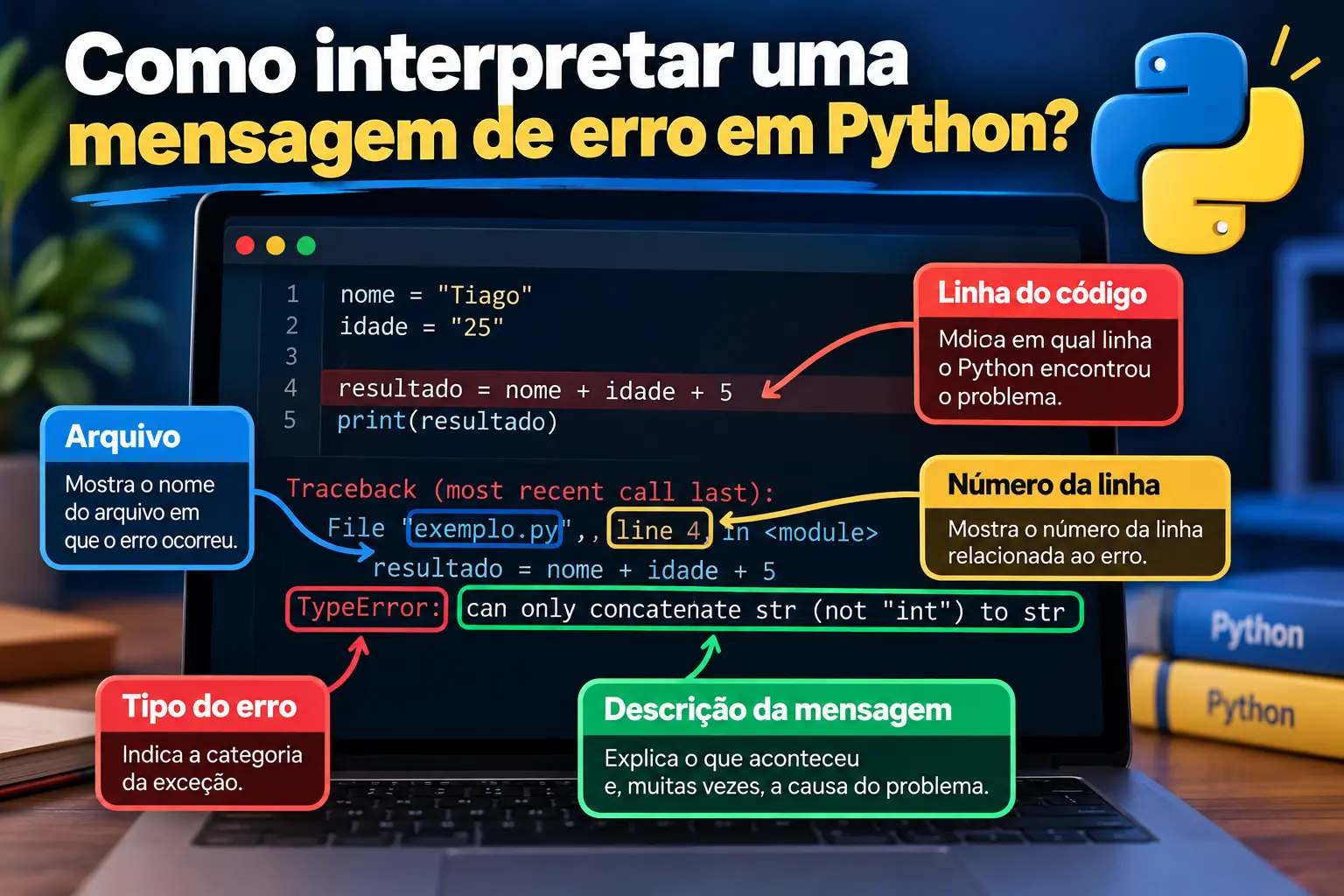
When you run this code, you will encounter a TypeError because the expression attempts to add a string to an integer.
The message will look similar to this:
TypeError: can only concatenate str (not "int") to strThis message may seem complicated at first, but it contains useful information.
What Is a Traceback?
When an exception is not handled, Python usually displays a traceback showing the execution path leading to the point where the problem occurred.
A traceback typically contains:
-
The name of the file being executed.
-
The line number associated with the problem.
-
The relevant code snippet, when available.
-
The type of exception.
-
A description of what happened.
The last line is usually a good starting point because it provides the exception name and a brief explanation.
How to Find the Line Containing the Error
Look for an indication similar to this:
File "program.py", line 4This tells you that Python is pointing to line 4 of the program.py file.
However, the indicated line does not always contain the exact location that needs to be corrected. A syntax error, for example, may be detected somewhere different from where the missing symbol should have been.
Read the entire message, examine the indicated line, and check the preceding instructions as well.
What to Do When You Do Not Understand the Message
Follow this procedure:
-
Identify the error name, such as
TypeErrororNameError. -
Read the description that follows the name.
-
Locate the line indicated in the traceback.
-
Check the values, variables, and operations involved.
-
Make one small change and run the program again.
Avoid modifying several parts of your code at once. When you change one thing at a time, it becomes easier to identify which change solved the problem.
For a more detailed introduction to the language, see the article What Is Python?.
The 10 Most Common Python Errors and How to Fix Them
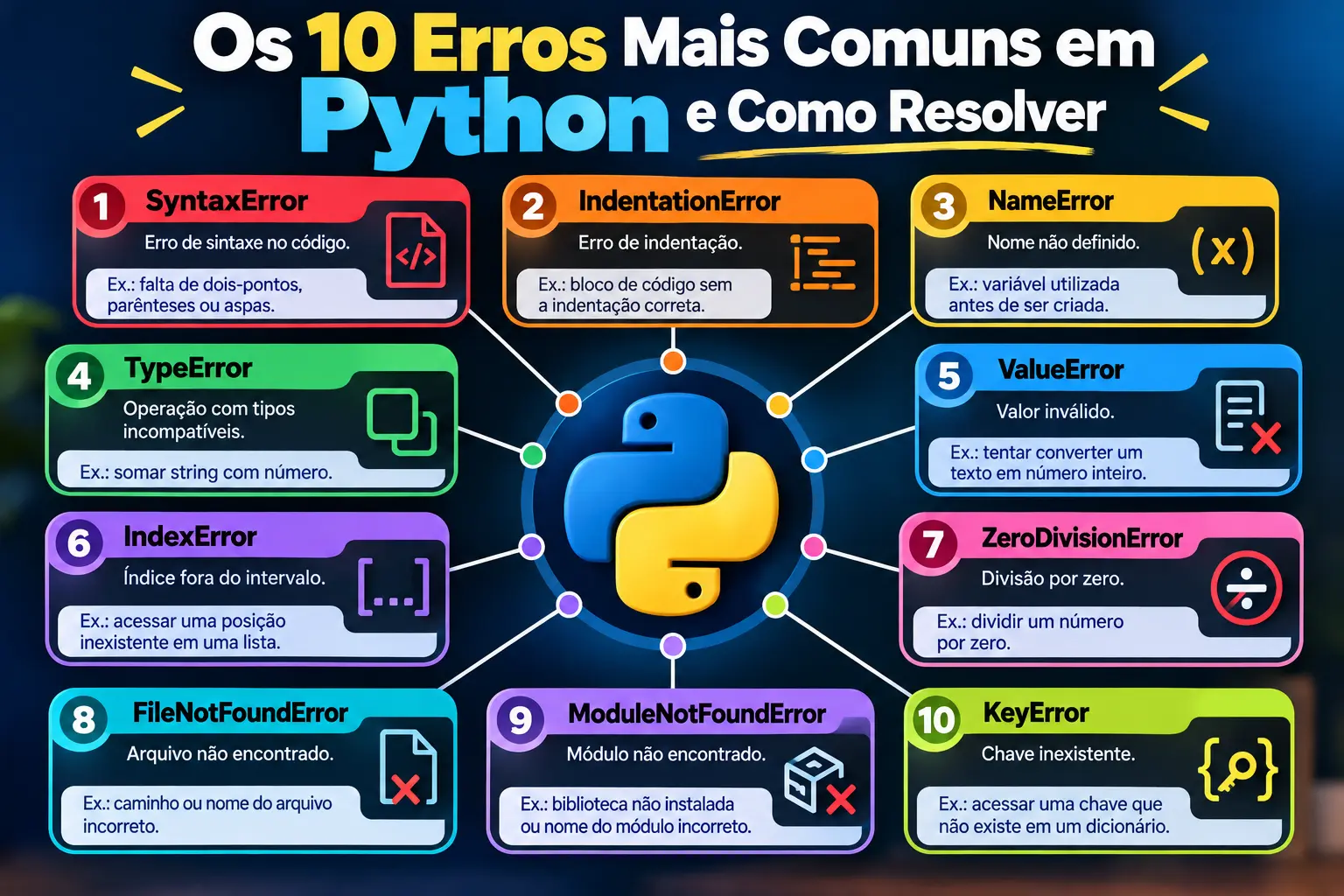
The following examples use features available in Python 3.12 or later and can be adapted to different editors and execution environments.
1. SyntaxError: Syntax Error
A SyntaxError occurs when the code does not follow the syntax expected by Python.
This can happen because of missing parentheses, unclosed quotation marks, forgotten colons, or incorrectly used keywords.
Incorrect example:
age = 25

if age >= 18
    print("Adult")
In this case, the colon (:) is missing at the end of the condition.
The message will look similar to this:
SyntaxError: expected ':'How to fix it:
age = 25

if age >= 18:
    print("Adult")
The code is now syntactically correct and prints Adult.
How to avoid this error: Check for colons after if, elif, else, for, while, def, and other structures that require this symbol. Also make sure that parentheses, brackets, and quotation marks are properly closed.
If you want to review the expressions and operators used in these conditions, see Expressions in Python.
2. IndentationError: Incorrect Indentation
Python uses indentation, meaning the spaces at the beginning of lines, to define code blocks.
Incorrect indentation can prevent a program from running.
Incorrect example:
if True:
print("Hello, world!")
The print() statement should be inside the block started by the if statement.
The message will look similar to this:
IndentationError: expected an indented blockHow to fix it:
if True:
    print("Hello, world!")
The statement is now correctly indented.
How to avoid this error: Use four spaces per indentation level and maintain a consistent pattern. Most code editors make this process easier, but it is important to understand why indentation is necessary.
Indentation is also essential in functions, loops, and conditional statements.
3. NameError: Undefined Name
A NameError occurs when a program attempts to use a name that has not been defined in the context where it is accessed.
This often happens when a variable is misspelled or has not yet been assigned a value.
Incorrect example:
name = "Tiago"

print(nam)
The defined variable is name, but the code attempts to access nam.
The message will look similar to this:
NameError: name 'nam' is not definedHow to fix it:
name = "Tiago"

print(name)
Output:
TiagoHow to avoid this error: Check the spelling of names and remember that Python is case-sensitive. For example, name, Name, and NAME are different identifiers.
Also check that the variable was defined before being used and that it is accessible in the current context.
4. TypeError: Operation with Incompatible Types
A TypeError occurs when an operation or function receives a data type that is inappropriate for the task it needs to perform.
This error is common when strings, numbers, lists, and other objects are combined in incompatible ways.
Incorrect example:
age = 25

message = "My age is " + age

print(message)
The + operator cannot directly concatenate a string with an integer.
The message will look similar to this:
TypeError: can only concatenate str (not "int") to strHow to fix it:
One option is to convert the number to a string:
age = 25

message = "My age is " + str(age)

print(message)
Output:
My age is 25Another, generally more convenient, option is to use an f-string:
age = 25

message = f"My age is {age}"

print(message)
Both corrected versions produce the expected result.
How to avoid this error: Identify the type of each value before performing operations. When working with user input, remember that the input() function returns a string, even when the user enters a number.
For more information, see Arithmetic Operators in Python.
5. ValueError: Invalid Value
A ValueError occurs when an operation receives a value of the appropriate type but cannot use it in that particular situation.
A common example is attempting to convert text that does not represent an integer into an int.
Incorrect example:
age = int("twenty")

print(age)
The int() function cannot convert the word "twenty" into an integer.
The message will look similar to this:
ValueError: invalid literal for int() with base 10: 'twenty'How to fix it:
If the goal is to work with a numeric age, use a value that represents an integer:
age = int("20")

print(age)
Output:
20If the data comes from the user, it is better to validate the input and handle the exception:
try:
    age = int(input("Enter your age: "))
    print(f"Your age is {age}.")
except ValueError:
    print("Please enter your age as a whole number.")
If the user enters a word, the program displays an understandable message instead of terminating because of an unhandled exception.
How to avoid this error: Validate incoming data and handle potentially invalid values. Do not assume that every user input will have the expected format.
6. IndexError: Index Out of Range
An IndexError occurs when you attempt to access a position that does not exist in a sequence, such as a list or tuple.
In Python, list indexes start at zero.
Incorrect example:
fruits = ["apple", "banana", "grape"]

print(fruits[3])
The list contains three elements, whose indexes are 0, 1, and 2. Therefore, index 3 does not exist.
The message will look similar to this:
IndexError: list index out of rangeHow to fix it:
To access the third element, use index 2:
fruits = ["apple", "banana", "grape"]

print(fruits[2])
Output:
grapeAnother option is to iterate through the list without selecting indexes manually:
fruits = ["apple", "banana", "grape"]

for fruit in fruits:
    print(fruit)
How to avoid this error: Check the sequence length before accessing a position, and remember that the last valid index of a non-empty list is len(list) - 1.
7. ZeroDivisionError: Division by Zero
A ZeroDivisionError occurs when a program attempts to divide an integer or floating-point number by zero.
In mathematics, this operation is undefined.
Incorrect example:
numerator = 10
denominator = 0

result = numerator / denominator

print(result)
The message will look similar to this:
ZeroDivisionError: division by zeroHow to fix it:
If the denominator comes from a variable, check that it is not zero before performing the division:
numerator = 10
denominator = 2

if denominator != 0:
    result = numerator / denominator
    print(result)
else:
    print("Division by zero is not possible.")
Output:
5.0How to avoid this error: Validate values before mathematical operations, especially when the data is provided by the user or calculated during execution.
8. FileNotFoundError: File Not Found
A FileNotFoundError occurs when a program attempts to access a file that cannot be found at the specified path.
This can happen because the filename is incorrect, the file does not exist, or the path does not match its actual location.
Incorrect example:
with open("nonexistent_records.txt", "r", encoding="utf-8") as file:
    content = file.read()

print(content)
If the file does not exist where the program is looking for it, a message similar to this will appear:
FileNotFoundError: [Errno 2] No such file or directoryHow to fix it:
Check the filename and path. If the file should be in the same directory as the program, create a file named records.txt with some content and use:
with open("records.txt", "r", encoding="utf-8") as file:
    content = file.read()

print(content)
To make the program more user-friendly, you can also handle the exception:
try:
    with open("records.txt", "r", encoding="utf-8") as file:
        content = file.read()

    print(content)
except FileNotFoundError:
    print("The records.txt file was not found.")
How to avoid this error: Check the file location, filename spelling, and the program's working directory. A relative path such as "records.txt" is interpreted relative to the current working directory, which does not always match the directory containing the Python file.
9. ModuleNotFoundError: Module Not Found
A ModuleNotFoundError occurs when Python attempts to import a module that it cannot locate.
The cause may be a misspelled name, an uninstalled dependency, or a different Python environment from the one in which the package is available.
Incorrect example:
import module_that_does_not_existBecause this module does not exist in the current environment, Python will display a message similar to this:
ModuleNotFoundError: No module named 'module_that_does_not_exist'How to fix it:
If you intended to use the standard math module, for example, import the correct name:
import math

print(math.sqrt(25))
Output:
5.0If the error involves an external library, check the package's official name and whether it is installed in the environment where the program is running.
How to avoid this error: Check the module name, dependency installation, and Python interpreter selected in your editor. Not every module needs to be installed: the standard library is already included with Python.
10. KeyError: Missing Dictionary Key
A KeyError occurs when you attempt to access a key in a dictionary that does not exist.
Unlike lists, dictionaries use keys to locate values.
Incorrect example:
person = {
    "name": "Tiago",
    "age": 25
}

print(person["email"])
The dictionary contains the keys "name" and "age", but it does not contain "email".
The message will look similar to this:
KeyError: 'email'How to fix it:
If the key is optional, use the get() method:
person = {
    "name": "Tiago",
    "age": 25
}

email = person.get("email", "Not provided")

print(email)
Output:
Not providedIf the field is required, check whether the key exists and investigate why it was not created or loaded correctly.
How to avoid this error: Check key names and use get() when a value may be missing. Do not use this method indiscriminately when a missing key indicates a problem that needs to be fixed.
Case Study: How to Find and Fix an Error Step by Step
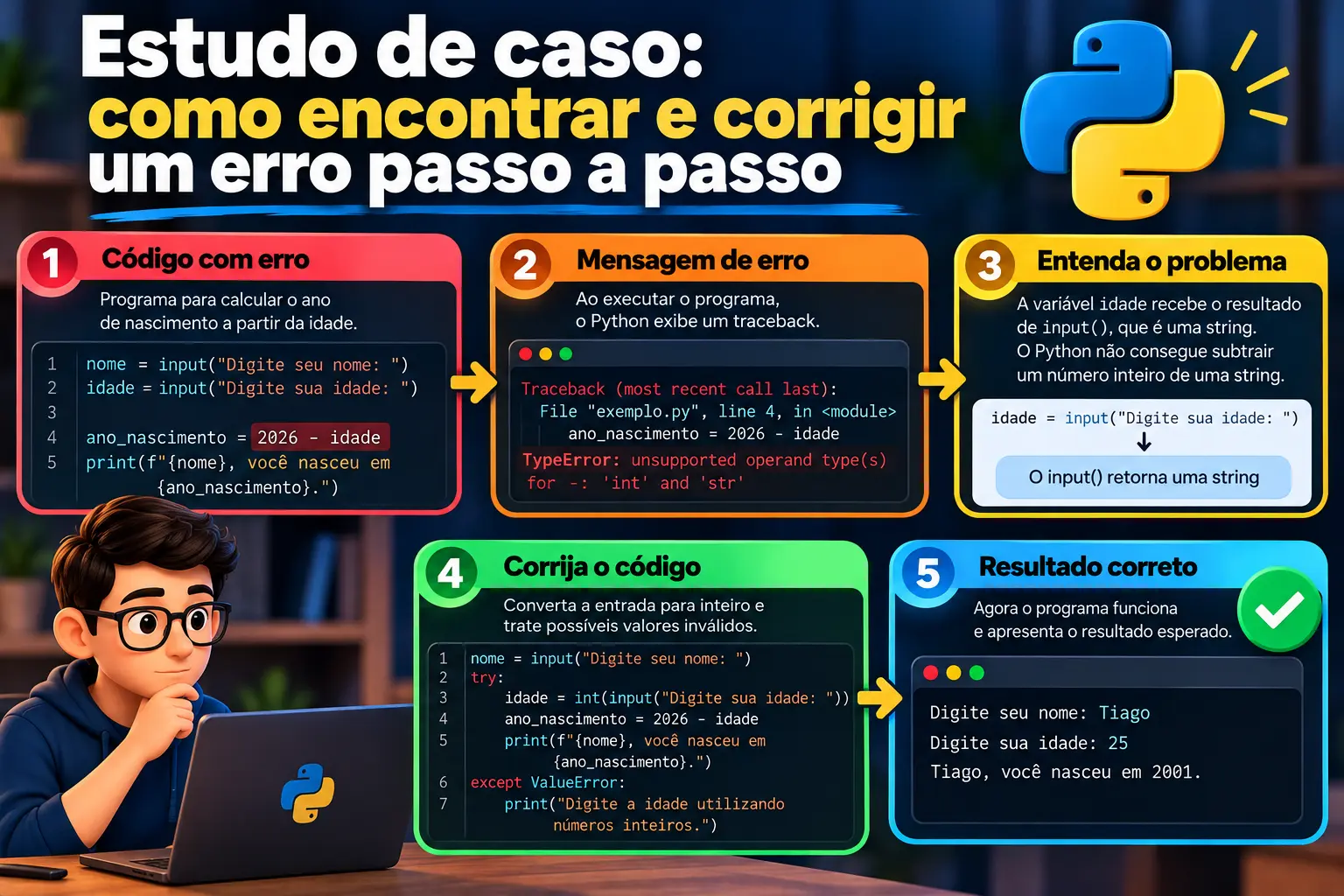
Imagine you are creating a small program to register people and calculate their reported year of birth based on their age.
The initial code is:
name = input("Enter your name: ")
age = input("Enter your age: ")

birth_year = 2026 - age

print(f"{name}, you were born in {birth_year}.")
The goal seems simple: read the name, receive the age, calculate the approximate year of birth, and display the result.
However, when you run the program, you will encounter a TypeError.
Step 1: Read the Error Message
The message will look similar to this:
TypeError: unsupported operand type(s) for -: 'int' and 'str'Python is telling you that it cannot subtract a string (str) from an integer (int).
Step 2: Locate the Problematic Statement
The line that needs attention is:
birth_year = 2026 - ageThe age variable received the result of input(). This function returns a string, even when the user enters something like 25.
Therefore, the problem is not in the final message or the name variable. It is the attempt to subtract text from a number.
Step 3: Correct the Data Type
Convert the input to an integer:
name = input("Enter your name: ")
age = int(input("Enter your age: "))

birth_year = 2026 - age

print(f"{name}, you were born in {birth_year}.")
If the user enters Tiago and 25, the result will be:
Tiago, you were born in 2001.This calculation considers only the year and does not account for whether the person has already had their birthday in the reference year.
Step 4: Consider What Could Go Wrong Next
The corrected code can still raise a ValueError if the user enters a word in the age field.
A version better prepared for this situation is:
name = input("Enter your name: ")

try:
    age = int(input("Enter your age: "))

    if age < 0:
        print("Age cannot be negative.")
    else:
        birth_year = 2026 - age
        print(f"{name}, your approximate birth year is {birth_year}.")

except ValueError:
    print("Please enter your age as a whole number.")
The program now handles inputs that cannot be converted to integers and also checks whether the age is negative.
This example demonstrates an essential skill: fixing an error does not simply mean making the program work once. It means understanding the cause, considering other possible inputs, and making the program's behavior more predictable.
Best Practices for Debugging Python Code
Debugging is the process of investigating a program to understand why it does not behave as expected and, when necessary, correcting the problem.
Some habits make this task easier.
1. Read the Error Message Before Changing the Code
Do not start by deleting lines or modifying several variables. First, identify the error type and read its description.
2. Check the Indicated Line and Its Context
Examine the statement mentioned in the traceback and the lines related to it. The problem may originate from a value created earlier.
3. Check Data Types
When working with mathematical operations, conversions, or concatenations, confirm that the values have the expected types.
4. Test One Change at a Time
Make a small correction and run the program again. This helps you identify the effect of the change.
5. Use Debugging Messages
During development, statements such as print() can help you inspect variable values:
age = input("Enter your age: ")

print("Received value:", age)
print("Received type:", type(age))
This example helps you see that input() returns a string.
6. Consult the Documentation
When you do not understand a message, look up the exact exception name in the official documentation or other reliable technical sources.
The Python documentation contains explanations of errors and exceptions, as well as a list of built-in exceptions.
7. Do Not Indiscriminately Suppress All Errors
Using try and except can make a program more robust, but catching every exception without investigating its cause can make problems harder to identify.
Handle the exceptions you expect may occur and provide useful messages for people using the program.
If you want to deepen your understanding of program organization and execution, also read Understanding the Entry Point of a Python Program.
Conclusion: Learn Python with Greater Confidence
Learning to fix errors in Python is an important part of every programmer's development. At first, error messages may seem difficult to interpret, but they provide clues about what happened during code execution.
By learning about errors such as SyntaxError, IndentationError, NameError, TypeError, ValueError, IndexError, ZeroDivisionError, FileNotFoundError, ModuleNotFoundError, and KeyError, you will become better at recognizing common situations and investigating problems independently.
Remember that the goal is not to memorize every error message. The most important thing is to develop a method: read, locate, understand, fix, and test.
The more you practice, the more natural this process will become.
Want to keep learning programming?
Visit the free e-books page from Entre Bugs e Soluções and find resources to deepen your knowledge and continue your Python studies.